Categorical Predictors

Prof. Eric Friedlander

Application Exercise

📋 AE 14 - Multiple Linear Regression and Categorical Predictors

Complete Exercise 0-1.

Computational setup

# load packages
library(tidyverse)
library(broom)
library(mosaic)
library(ISLR2)
library(patchwork)
library(knitr)
library(coursekata)
library(kableExtra)
library(scales)

# set default theme and larger font size for ggplot2
ggplot2::theme_set(ggplot2::theme_minimal(base_size = 16))

# Create new variable

Credit <- Credit |> 
  mutate(Has_Balance = factor(ifelse(Balance == 0, "No", "Yes")))

Considering multiple variables

Data: Credit Cards

The data is from the Credit data set in the ISLR2 R package. It is a simulated data set of 400 credit card customers.

Rows: 400
Columns: 12
$ Income      <dbl> 14.891, 106.025, 104.593, 148.924, 55.882, 80.180, 20.996,…
$ Limit       <dbl> 3606, 6645, 7075, 9504, 4897, 8047, 3388, 7114, 3300, 6819…
$ Rating      <dbl> 283, 483, 514, 681, 357, 569, 259, 512, 266, 491, 589, 138…
$ Cards       <dbl> 2, 3, 4, 3, 2, 4, 2, 2, 5, 3, 4, 3, 1, 1, 2, 3, 3, 3, 1, 2…
$ Age         <dbl> 34, 82, 71, 36, 68, 77, 37, 87, 66, 41, 30, 64, 57, 49, 75…
$ Education   <dbl> 11, 15, 11, 11, 16, 10, 12, 9, 13, 19, 14, 16, 7, 9, 13, 1…
$ Own         <fct> No, Yes, No, Yes, No, No, Yes, No, Yes, Yes, No, No, Yes, …
$ Student     <fct> No, Yes, No, No, No, No, No, No, No, Yes, No, No, No, No, …
$ Married     <fct> Yes, Yes, No, No, Yes, No, No, No, No, Yes, Yes, No, Yes, …
$ Region      <fct> South, West, West, West, South, South, East, West, South, …
$ Balance     <dbl> 333, 903, 580, 964, 331, 1151, 203, 872, 279, 1350, 1407, …
$ Has_Balance <fct> Yes, Yes, Yes, Yes, Yes, Yes, Yes, Yes, Yes, Yes, Yes, No,…

Variables

Features (another name for predictors)

  • Cards: Number of credit cards
  • Rating: Credit Rating
  • Has_Balance: Whether they have a credit card balance

Outcome

  • Limit: Credit limit

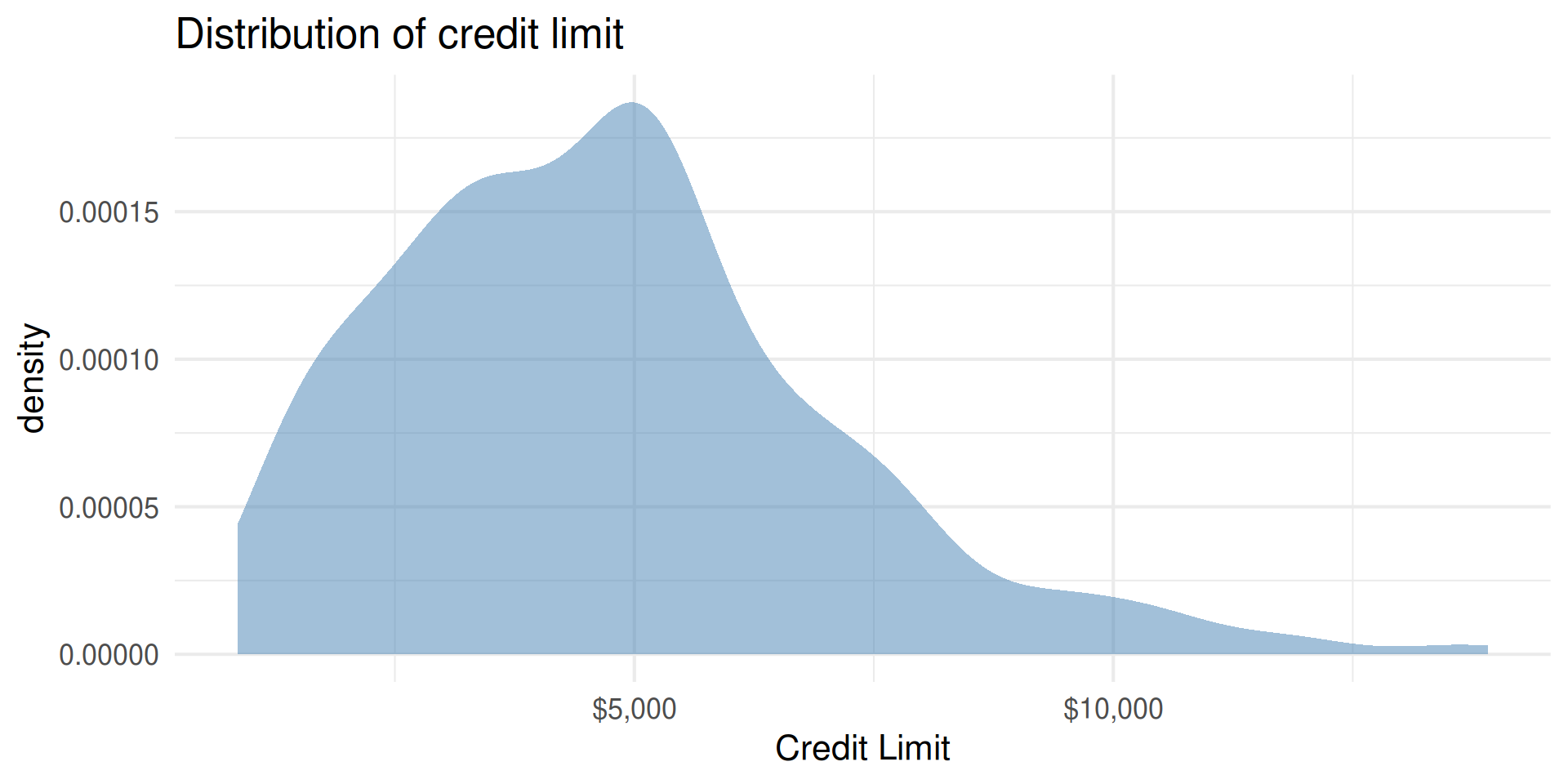
Outcome: Limit

Code
Credit |> 
  gf_density(~Limit, fill = "steelblue") |> 
  gf_labs(title = "Distribution of credit limit",
          x = "Credit Limit")|> 
  gf_refine(scale_x_continuous(labels = dollar_format()))
min Q1 median Q3 max mean sd n missing
855 3088 4622.5 5872.75 13913 4735.6 2308.199 400 0

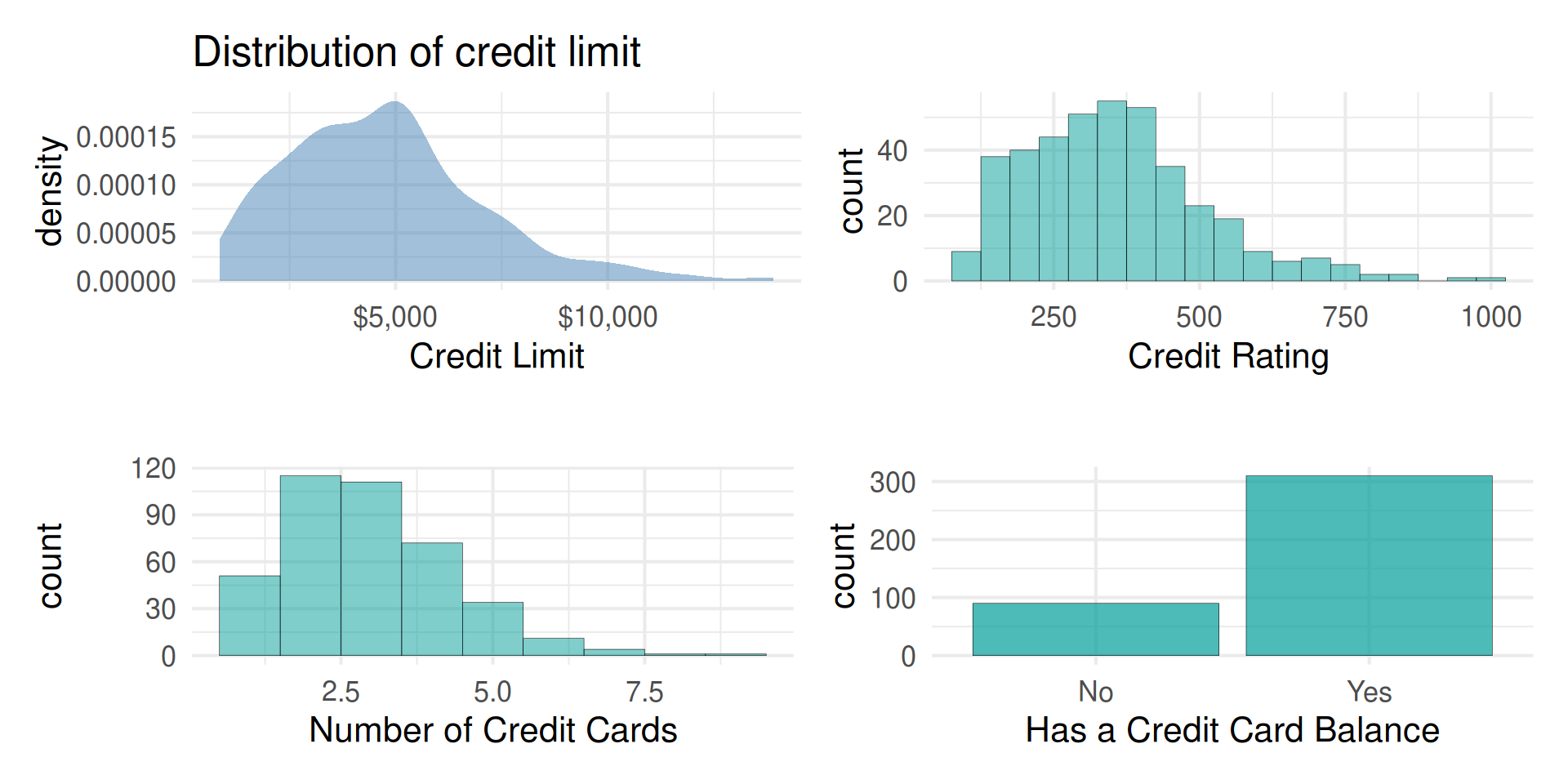
Predictors

Code
p1 <- Credit |> 
  gf_density(~Limit, fill = "steelblue") |> 
  gf_labs(title = "Distribution of credit limit",
          x = "Credit Limit")|> 
    gf_refine(scale_x_continuous(labels = dollar_format()))

p2 <- Credit |> 
  gf_histogram(~Rating, binwidth = 50) |> 
  gf_labs(title = "",
       x = "Credit Rating")

p3 <- Credit |> 
  gf_histogram(~Cards, binwidth = 1) |> 
  gf_labs(title = "",
       x = "Number of Credit Cards")

p4 <- Credit |> 
  gf_bar(~Has_Balance)|> 
  gf_labs(title = "",
       x = "Has a Credit Card Balance")

(p1 + p2) / (p3 + p4)
Outcome vs. predictors
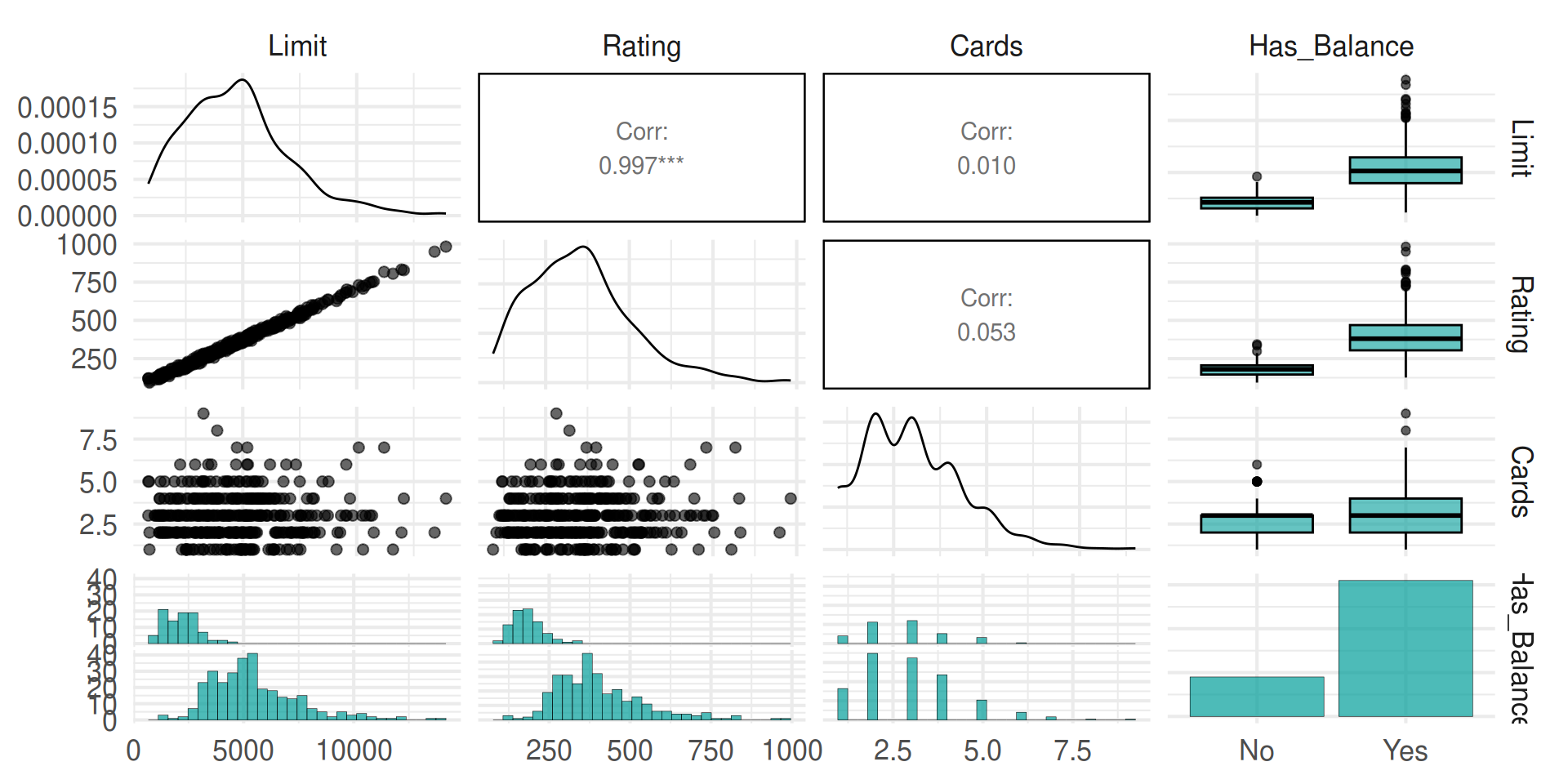
Code
library(GGally)

Credit |> 
  select(Limit, Rating, Cards, Has_Balance) |> 
  ggpairs()

Categorical Predictors

Indicator variables

  • Suppose there is a categorical variable with \(K\) categories (levels)

  • We can make \(K\) indicator variables - one indicator for each category

  • An indicator variable takes values 1 or 0

    • 1 if the observation belongs to that category
    • 0 if the observation does not belong to that category

Indicator Variables (behind the scenes)

  Has_Balance No_Balance Yes_Balance
1         Yes          0           1
2          No          1           0

Indicators in the model

  • We will use \(K-1\) of the indicator variables in the model.
  • The reference level or baseline is the category that doesn’t have a term in the model.
  • The coefficients of the indicator variables in the model are interpreted as the expected change in the response compared to the baseline, holding all other variables constant.
  • This approach is also called dummy coding and R will do this for you

Interpreting Categorical Predictors

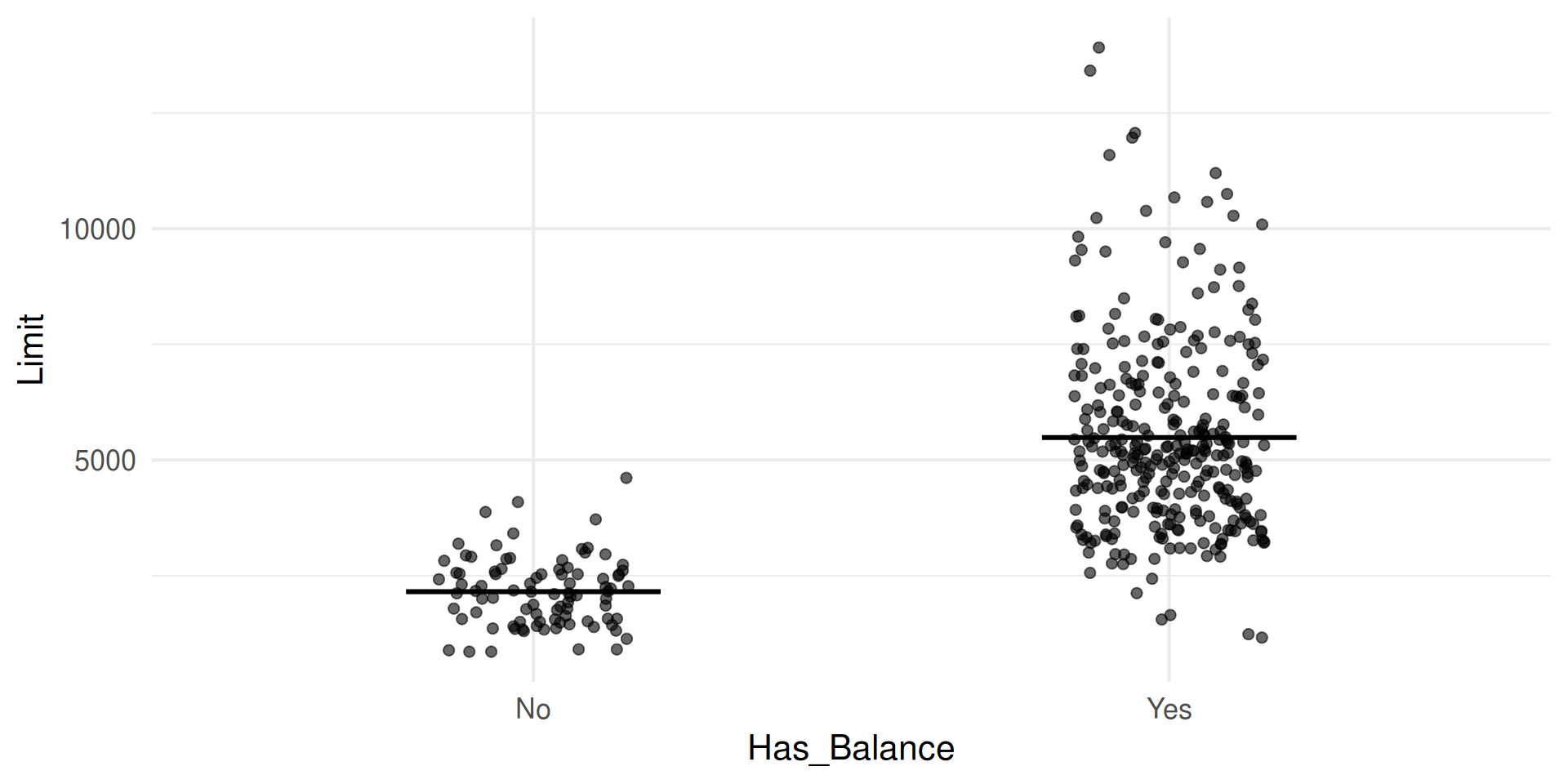
term estimate std.error statistic p.value
(Intercept) 2152.722 194.211 11.084 0
Has_BalanceYes 3332.746 220.609 15.107 0

  • Where do we see each of the estimates in the plot?
  • Where do we see the values we’d predict in the plot?
  • (Trick Question) Are Has_Balance and Limit correlated?
  • On the board. Write down the dummy coding for an observation from each level in your chosen categorical variable.

Complete Exercises 2-4.

Model equation

\[ \begin{align}\hat{\text{Limit}} = 2152.722 &+ 3332.746 \times \text{Yes_Balance} \end{align} \]

Adding in another predictor

Credit Limit vs. Cards: parallel slopes
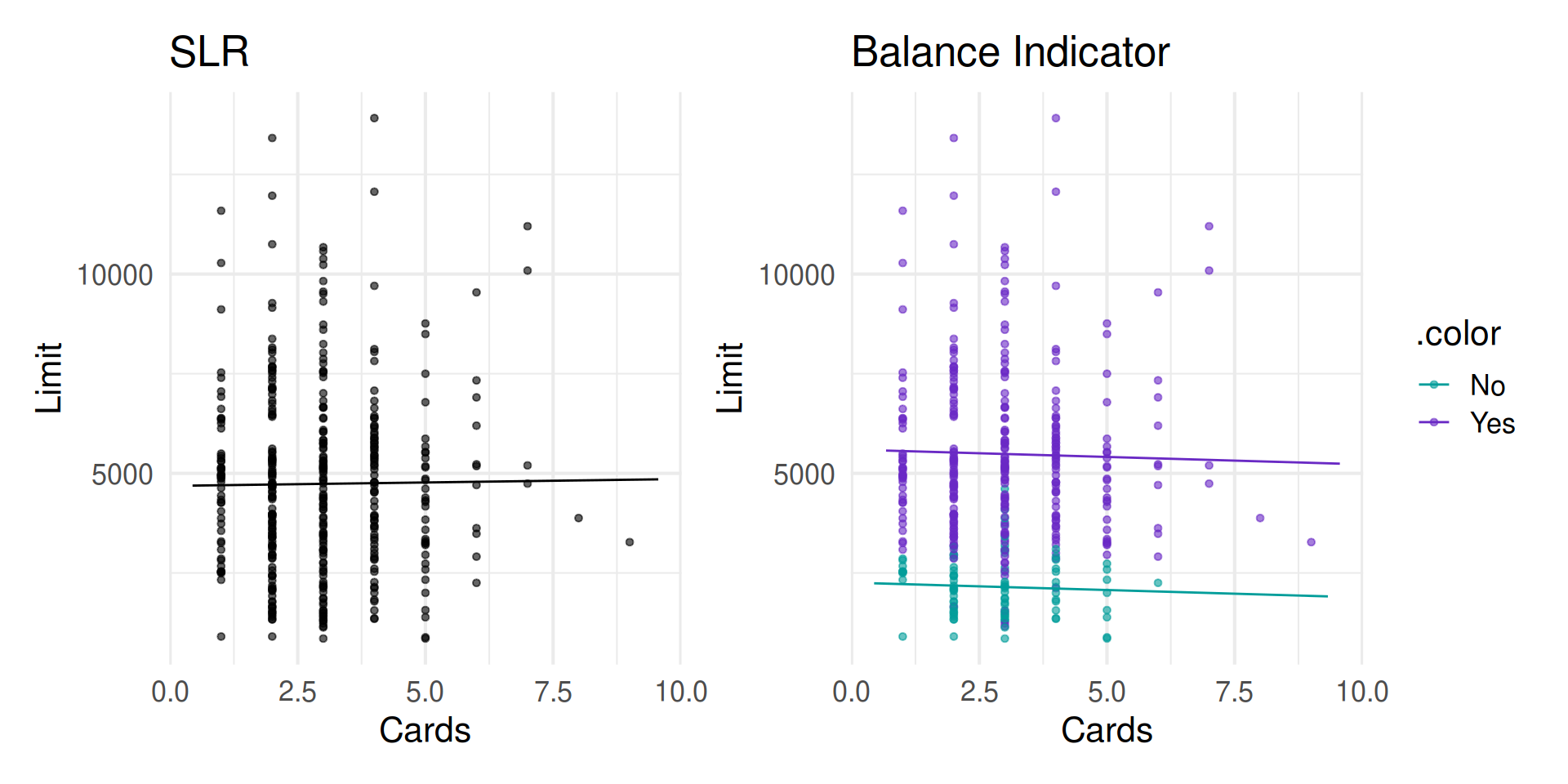
Code
cards_model <- lm(Limit ~ Cards, data = Credit)

cards_hasbal_model <- lm(Limit ~ Cards + Has_Balance, data = Credit)

p1 <- plotModel(cards_model) |>
  gf_labs(title = "SLR")
p2 <- plotModel(cards_hasbal_model) |>
  gf_labs(title = "Balance Indicator")

p1 + p2

Parallel slopes interpretation

term estimate std.error statistic p.value
(Intercept) 2257.044 272.007 8.298 0.000
Cards -36.964 67.419 -0.548 0.584
Has_BalanceYes 3339.198 221.117 15.102 0.000
  • Slope of Cards is -36.964 regardless of Has_Balance level
  • Change in Has_Balance corresponds to a shift in the intercept
    • Intercept for No is 2257.044
    • For Yes shift intercept up 3339.198
      • (i.e. intercept \(= 2257.044 + 3339.198 = 5596.242\))
  • Complete Exercise 5-6

Interaction terms

Interaction terms

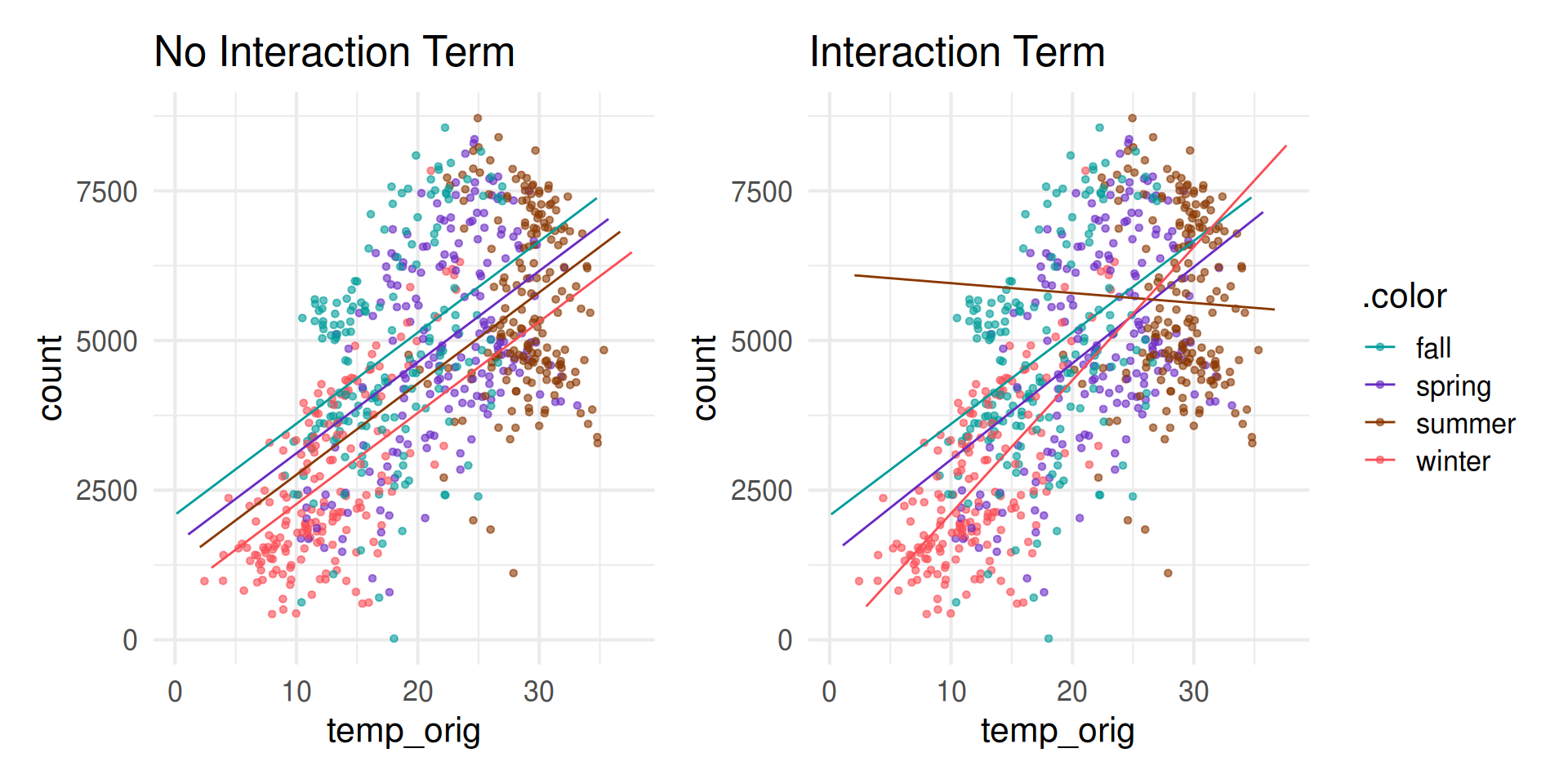
  • Sometimes the relationship between a predictor variable and the response depends on the value of another predictor variable.
  • This is an interaction effect.
  • To account for this, we can include interaction terms in the model.
  • We want a model of the form:

\[ \begin{aligned}\hat{Y} ~ = \hat{\beta}_0 & + \hat{\beta}_1 X_1 + \hat{\beta}_2 X_2 + \hat{\beta}_3X_1\times X_2 \end{aligned} \]

Interaction terms: Quantitative and Categorical

\[ \begin{aligned}\hat{\text{Limit}} ~ = \hat{\beta}_0 & + \hat{\beta}_1 \text{Cards} + \hat{\beta}_2 \text{Has_Balance} + \hat{\beta}_3\text{Cards}\times\text{Has_Balance} \end{aligned} \]

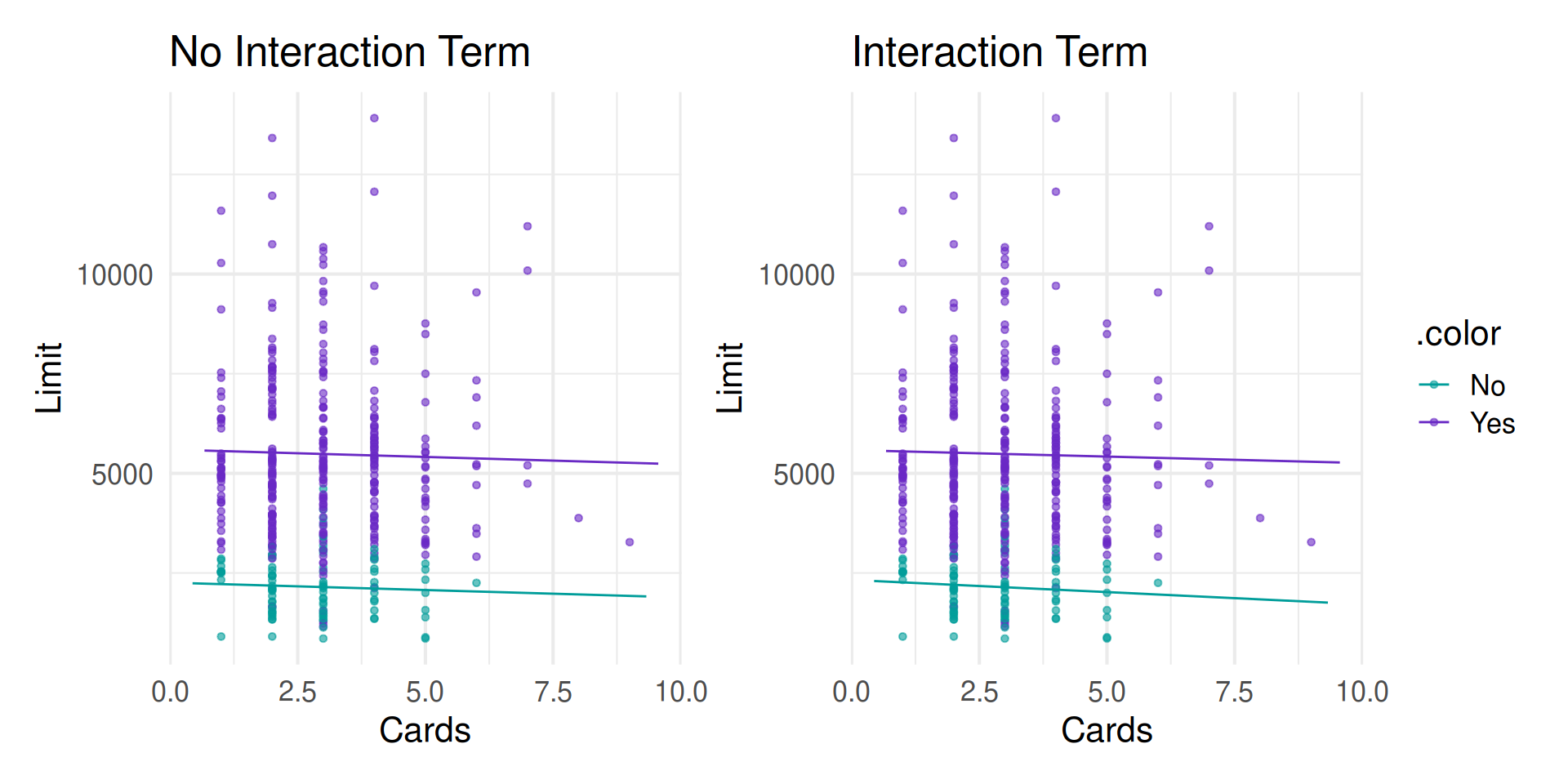
Interest rate vs. cards: interaction term
Bike Rentals vs. Temperature: interaction term
Interpreting interaction terms

term estimate std.error statistic p.value
(Intercept) 2324.664 515.510 4.509 0.000
Cards -60.924 169.143 -0.360 0.719
Has_BalanceYes 3257.976 570.455 5.711 0.000
Cards:Has_BalanceYes 28.499 184.470 0.154 0.877
  • Slope of Rating depends on Has_Balance level
  • Equivalent: fit two separate linear models on the data corresponding to each level of Has_Balance

Understanding the model

\[ \begin{aligned} \hat{Limit} &= 2324.664 - 60.924 \times Cards \\ &\qquad+ 3257.976 \times Has\_Balance\\ &\qquad+ 28.499 \times Cards \times Has\_Balance \end{aligned} \]

Interpreting the interaction term

  • For a borrower in no balance, the slope of Cards is \(-60.924\)
  • For a borrower with a balance, the slope of Cards is \((-60.924 + 28.499=-32.425)\)

Complete Exercise 7-8.

Interaction terms: Two Quantitative

\[ \begin{aligned}\hat{\text{Limit}} ~ = \hat{\beta}_0 & + \hat{\beta}_1 \text{Cards} + \hat{\beta}_2 \text{Rating} + \hat{\beta}_3\text{Cards}\times\text{Rating} \end{aligned} \]

Interpreting interaction terms

  • What the interaction means: The effect of the number of open credit cards on the credit limit depends on the borrowers credit rating and vice versa

Visualizing Model: No Interaction

Visualizing Interaction Model: Exaggerated

Visualizing Interaction Model: Real

Model Fit

term estimate std.error statistic p.value
(Intercept) -315.00522 46.72441 -6.74177 0.00000
Cards -81.11569 14.45641 -5.61105 0.00000
Rating 14.83433 0.11902 124.64042 0.00000
Cards:Rating 0.02376 0.03598 0.66030 0.50945

\[ \begin{aligned}\hat{\text{Limit}} ~ = & -315.005 + 14.834~\text{Rating} -81.116~\text{Cards}\\ & \qquad+ 0.024~\text{Rating}\times\text{Cards} \end{aligned} \]

Interpreting the interaction term

  • For a fixed Rating the slope of Cards is \((-81.116 + 0.024\times\text{Rating})\)
  • For a fixed Cards the slope of Rating is \((14.834 + 0.024\times\text{Cards})\)

What’s actually happening:

Credit_int <- Credit |>
  mutate(Interaction = Cards * Rating)

Credit_int |>
  select(Limit, Cards, Rating, Interaction) |>
  head() |>
  kable()
Limit Cards Rating Interaction
3606 2 283 566
6645 3 483 1449
7075 4 514 2056
9504 3 681 2043
4897 2 357 714
8047 4 569 2276

What’s actually happening:

lm(Limit ~ Cards + Rating + Interaction, data = Credit_int) |>
  tidy() |>
  kable(digits = 5)
term estimate std.error statistic p.value
(Intercept) -315.00522 46.72441 -6.74177 0.00000
Cards -81.11569 14.45641 -5.61105 0.00000
Rating 14.83433 0.11902 124.64042 0.00000
Interaction 0.02376 0.03598 0.66030 0.50945

Wrap up

Recap

  • Calculated predictions and associated intervals for multiple linear regression models

  • Introduced categorical variables

  • Used interaction terms

  • Complete Activity.